How to read from and write to files on disk — text and binary, single-call and line-by-line, with a closing menu-driven program that ties it all together.
Why files?
While a Python program is running, its data lives in memory — inside Python objects like lists, tuples, and dictionaries. The moment the program exits, that data is gone.
Files (and databases) are how you make data survive past a single run. As a rule of thumb: if the data is small and one program owns it, use a file. If it’s large or shared, reach for a database.
Concepts
Types
- Text files — human-readable characters (
.txt,.csv,.py,.md…). When you read them, Python decodes the bytes intostr. - Binary files — raw bytes (images, video, audio, PDFs). You read them as
bytes.
Process
Every file operation follows the same three steps:
- Open the file with
open(filename, mode). - Read or write through the file object.
- Close the file with
file_object.close()to release the resource.
f = open('example.txt', 'w')  # step 1
f.write('hello')              # step 2
f.close()                     # step 3
If the file is in the current working directory, just the name is enough. Otherwise, pass an absolute path.
Modes
Each mode is a single letter (r, w, a, x) optionally followed by + (read and write) or b (binary). The same letters mean the same thing in every combination.
Text modes
| Mode | Read | Write | Creates if missing | Truncates existing |
|---|---|---|---|---|
r | ✓ | — | — | — |
w | — | ✓ | ✓ | ✓ |
a | — | ✓ | ✓ | — |
x | — | ✓ | ✓ | — (errors if exists) |
r+ | ✓ | ✓ | — | — |
w+ | ✓ | ✓ | ✓ | ✓ |
a+ | ✓ | ✓ | ✓ | — |
r is the default — leave the mode out and Python assumes read.
Overwriting data
wandw+truncate the file the moment they open it. If the file already exists, its contents are gone before you write a single byte. Reach fora(append) orr+when you want to preserve existing data.
Exclusive mode (
x)
xis a saferw— it creates the file only if it doesn’t already exist. Use it when you want to guarantee you’re writing to a fresh file and getting an error otherwise.
Binary modes
Add b to any text mode to open the file in binary mode. The meaning of each mode is identical — only the data type changes from str to bytes.
| Text | Binary | Purpose |
|---|---|---|
r | rb | Read |
w | wb | Write (truncate) |
a | ab | Append |
x | xb | Exclusive write |
r+ | r+b | Read and write (no truncate) |
w+ | w+b | Read and write (truncate) |
a+ | a+b | Read and append |
When to use binary
Use binary mode for non-text files (images, video, archives, anything Python doesn’t know how to decode as text). It also avoids platform-specific newline translation, which is useful when transferring files between Windows and Unix.
File object properties
Once a file is open, f exposes a few attributes and methods worth knowing:
| Property / method | Returns |
|---|---|
f.name | The file’s name (as passed to open) |
f.mode | The mode the file was opened in |
f.closed | True if f.close() has been called |
f.readable() | True if the mode allows reading |
f.writable() | True if the mode allows writing |
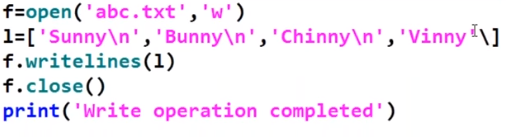
Writing
Two methods cover almost every case:
f.write('hello\n')            # one string
f.writelines(['a\n', 'b\n'])  # any iterable of strings — list, tuple, set
writelines does not add newlines for you. If you want each element on its own line, append \n to every element yourself — otherwise the file ends up as a single long line.
Reading
Four methods, each with a slightly different shape:
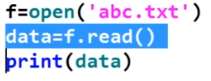
f.read()         # the entire file as one string
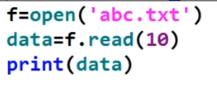
f.read(n)        # next n characters
f.readline()     # next single line (including '\n')
f.readlines()    # all lines as a list
A few practical notes:
- The file pointer advances after every read — calling
read()twice gives you the full file the first time and''the second. '\n'counts as a single character, sof.read(10)may end mid-line.

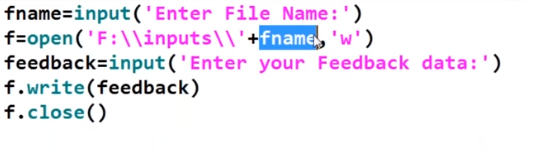
Example program:
Reading the whole file:
Reading the first ten characters:
Reading a single line — note that '\n' is one character:
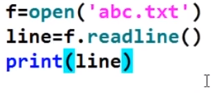
Extra blank lines from printing
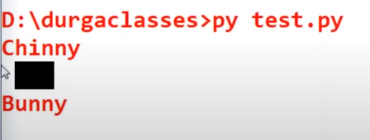
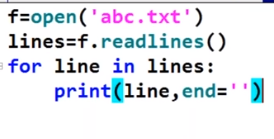
When you read multiple lines and print each one, you get extra blank lines between them —
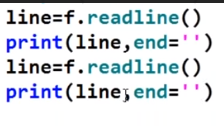
\non top of the line’s existing\n. Strip the trailing newline withend=''onrstrip('\n')on the line, to fix it.
Example:
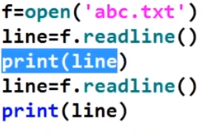
Output:
Add end='' to remove the extra blank line:
Reading all lines into a list — use a for loop to print them one by one:
The with statement
Manually calling close() is easy to forget, especially when an error is raised mid-operation. The with statement closes the file for you, even if an exception fires:
with open('example.txt', 'r') as f:
    data = f.read()
# f is closed here, even if `read()` raised
Prefer
withReach for
with open(...) as fby default. It makes the close explicit and removes a whole class of bugs around leaked file handles. The manualf = open(...)/f.close()pattern is only useful when you need the file object to outlive a single block.
Copying data between files
A common task: read one file, write its contents to another. The with form keeps it tight:
with open('input.txt') as src, open('output.txt', 'w') as dst:
    dst.write(src.read())
Putting it together
A small menu-driven program that demonstrates create, read, append, rename, and remove on a single file:
import os

_FILE = ""

def readfile():
    print("\n-----------------------------------")
    print("      --- Contents of file ----\n")
    global _FILE
    with open(_FILE) as fs:
        print(fs.read())

def appendfile():
    global _FILE
    with open(_FILE, 'a') as fs:
        limit = int(input("Enter the no of students "))
        for i in range(limit):
            name = input("\n Enter the name of the student _ ")
            roll = input(" Enter the roll no of the student _ ")
            address = input("Enter the address of the student_ ")
            class_name = input("Enter the class of student_ ")
            fs.write(name + '\n')
            fs.write(roll + '\n')
            fs.write(class_name + '\n')
            fs.write(address + '\n')

def renamefile():
    global _FILE
    src = _FILE
    dest = input("Enter the new name for file with extension _ ")
    os.rename(src, dest)
    print("File successfully renamed !!")
    _FILE = dest

def menu():
    global _FILE
    _FILE = input("Enter file name with extension __ ")
    while True:
        print("\n==================")
        print("1. Create file")
        print("2. Read file")
        print("3. Append file")
        print("4. Rename file")
        print("5. Remove file")
        print("6. Quit program")
        print("==================")
        choice = int(input("Enter the choice _ "))
        if choice == 1:
            _FILE = input("Enter new file name _ ")
            with open(_FILE, 'x') as fs:
                pass
        elif choice == 2:
            readfile()
        elif choice == 3:
            appendfile()
        elif choice == 4:
            renamefile()
        elif choice == 5:
            if os.path.exists(_FILE):
                os.remove(_FILE)
            else:
                print("The file does not exist")
        elif choice == 6:
            break
        else:
            print("Not a valid input")

menu()
Each branch uses the operation it needs — x to create safely, a to append without truncating, os.rename and os.remove for filesystem-level changes — and every file handle is closed automatically by the with block.