Why ?
Saving the data permanently for the future purpose.
Temporary storage areas : while a program executes, the data stored is required, but once the execution is complete, the data is no longer available.
example of storage structure objects in python : List, tuple, and dictionary
The data will be stored in Python Virtual Machine
Permanent storage area : files and databases are means of storing data permanently stored. On a broad prospective , if you have huge amount of data, go for database,else go for file concept.
File handling concepts
Types:
- Text files : text data like names, mark, numbers etc.
- Binary files : data like images, video, audio files etc.
Process
Open the file, : for writing or reading
open(filename, mode/purpose)
- if the source code and file are in the same folder, only file name with extension is required i.e. in the current working directory, else absolute path is required.
eg: f = open('example.txt','w')
The allowed modes
-
‘r’ : read operation
Opens an existing file for read operation.
file pointer is pointing to the first position.
If the file is not available, then we will ‘file not found’ error. [PVM checks for the file]
Default mode is read operation
-
‘w’ : write operation
Opens a file for write operation, if the file is not available, then P.V.M. will create a file.
If this file already contains any data, the data is going to be override.
-
‘a’ : append operation
Opens a file for append, if file is not available , creates a file.
If the file exists, the data is not going to be override, instead, the file pointer points to the last position and new data will be added as continuation.
-
‘x’ : exclusive {exclusive write operation}
Exactly same as write operation, but in ‘x’ the file should compulsory not available. The mode creates a new file and starting writing to it.
If file exists already, then ‘File exist error’ is occurred.
-
‘r+’: read and write
No overriding of existing data
-
‘w+’: write and read
Override existing data
-
‘a+’: append and read
It wont override existing data
These modes are applicable only for text files.
For Binary files, there also exists 7 modes :
-
‘rb’ : read operation
Opens an existing file for read operation.
file pointer is pointing to the first position.
If the file is not available, then we will ‘file not found’ error. [PVM checks for the file]
Default mode is read operation
-
‘wb’ : write operation
Opens a file for write operation, if the file is not available, then P.V.M. will create a file.
If this file already contains any data, the data is going to be override.
-
‘ab’ : append operation
opens a file for append, if file is not available , creates a file.
If the file exists, the data is not going to be override, instead, the file pointer points to the last position and new data will be added as continuation.
-
‘r+b’: read and write
No overriding of existing data
-
‘w+b’: write and read
Override existing data
-
‘a+b’: append and read
It wont override existing data
-
‘xb’ : exclusive
Exactly same as write operation, but in ‘x’ the file should compulsory not available. The mode creates a new file and starting writing to it.
If file exists already, then ‘File exist error’ is occurred.
-
after performing the required operations, the file should be closed in order to de-allocate the resources allocated for the file object.
- syntax:
file_object.close()
- syntax:
Various properties of file object.
// assume f as a file object
- f.name name of the file is returned
- f.mode opened mode
- f.closed is the file is closed
- f.readable() a method to check the file is readable or not, returns bool answer
- f.writable() a method to check the file is writable or not, returns bool answer
Operation
- write operation
- file_object.write(
str) - add ‘\n’ to get into new line
- file_object.write(
- writeline operation
- file_object.writelines(
list_of_lines) - list of lines can be of form list, tuple, or set
- By default, the data will be written to a single line, if you want to be in multiple lines, add a ‘\n’ to the elements.
- file_object.writelines(
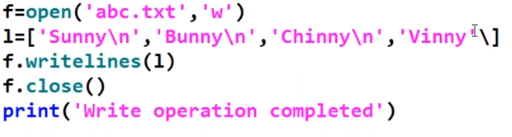
- read operation
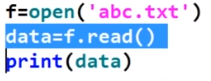
file_object.read() # to read total data from the file
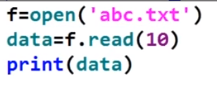
file_object.read(n) # to read n characters from file
file_object.readline() # to read single line
file_object.readlines() # to read all lines into a list
Dynamic inputting and outputting
- if a single ” is used , it is considered as a escape character, to overcome this problem , use ’\’

example program :
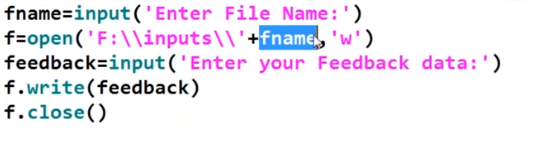
// reading data
// reading first ten characters
// reading a single line.
// new line,i.e. ‘\n’ (escape character) is considered as a single character
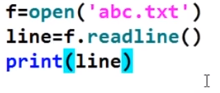
while using multiple lines , printing it individually, the output will have extra empty lines as a result of individual print statements
example :
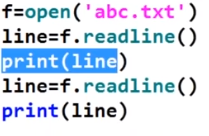
o/p:
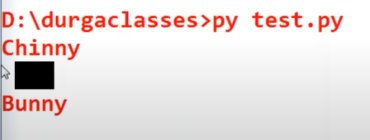
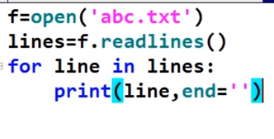
here the new line b.w ‘Chinny’ and ‘Bunny’ is due to individual print statements. To resolve the issue, add a parameter , end=”
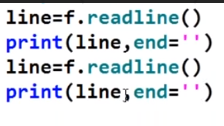
// reading lines of files as list of lines, hence a loop is used to out the lines
coping data from one file to another file
#consider file input.txt, having input data
#taking input data and coping it to file output.txt

f1 = open('input.txt')
f2 = open('output.txt','w')
f2.write(f1.read())
f1.close()
f2.close()
’with open() as ’ operation
// using ‘with open’ approach we do not have to use close() method to explicitly close the file object, the approach will automatically close the file object.
with open('filename.extension','mode') as file_object:
  # perform the necessary operations
// if you are skeptical, use closed() method to check
Creating , renaming and removing file
def renamefile():
    global _FILE
    src = _FILE
    dest = input("Enter the new name for file with extension _ ")
    os.rename(src , dest) # renmae file
    print("File successfully renamed !!")
    _FILE = dest
#create file
_FILE = input("Enter new file name _ ")
with open(_FILE,'x') as fs :
pass#remove file
if os.path.exists(_FILE):
os.remove(_FILE)
else:
print("The file does not exist")#file handling
import os
_FILE = ""
def readfile():
print("\n-----------------------------------")
print(" --- Contents of file ----\n")
global _FILE
with open(_FILE) as fs:
print(fs.read())
def appendfile():
global _FILE
with open(_FILE, 'a') as fs:
limit = int(input("Enter the no of students "))
for i in range(limit):
name = input("\n Enter the name of the student _ ")
roll = input(" Enter the roll no of the student _ ")
adddress = input("Enter the address of the student_ ")
class_name = input("Enter the class of student_ ")
fs.write(name + '\n')
fs.write(roll + '\n')
fs.write(class_name + '\n')
fs.write(address + '\n')
def renamefile():
global _FILE
src = _FILE
dest = input("Enter the new name for file with extension _ ")
os.rename(src , dest)
print("File successfully renamed !!")
_FILE = dest
def menu():
global _FILE
_FILE = input("Enter file name with extension __ ")
while(1):
print("\n==================")
print("1. Create file")
print("2. Read file")
print("3. Append file")
print("4. Rename file")
print("5. Remove file")
print("6. quit program")
print("==================")
choice = int(input("Enter the choice _ "))
if choice == 1:
_FILE = input("Enter new file name _ ")
with open(_FILE,'x') as fs :
pass
elif choice == 2 :
readfile()
elif choice == 3:
appendfile()
elif choice == 4:
renamefile()
elif choice == 5:
if os.path.exists(_FILE):
os.remove(_FILE)
else:
print("The file does not exist")
elif choice == 6:
break
else:
print("Not a valid input")
os.sleep(3)
menu()