Introduction
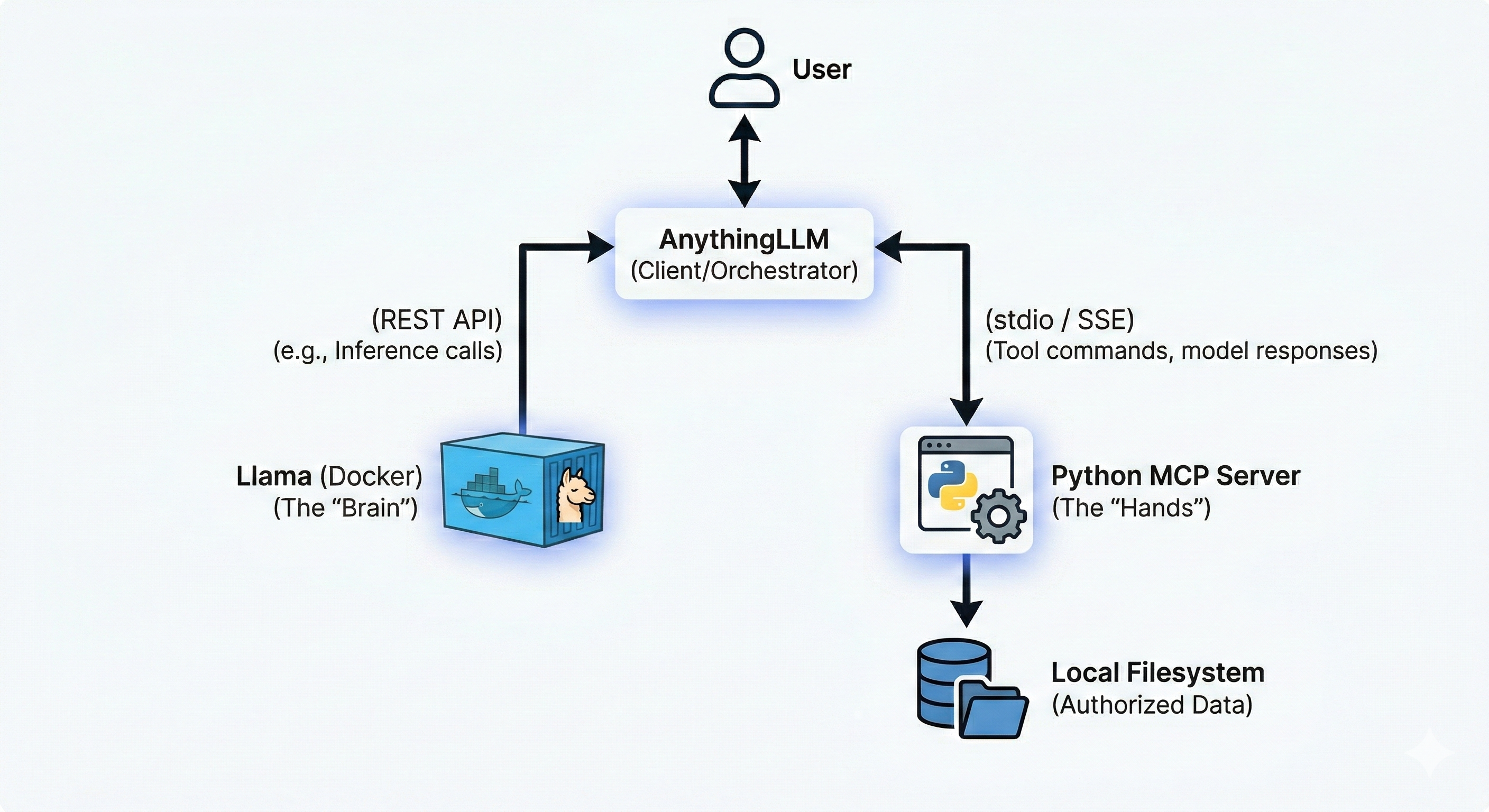
This system is intended to form a closed loop system, which is private and secure. The architecture follows a “client-server-provider” model where AnythingLLM acts as the central orchestrator (Client).
MCP - Model Context Protocol is an open source standardized universal interface which allows AI models to interact with external tools, data and systems.
Components
-
User Interface (AnythingLLM): The desktop or Docker-based app where you chat. It manages the conversation history and decides when to call a “tool” (MCP Skill).
-
Inference Engine (Llama in Docker): A containerized instance of Llama (typically via llama.cpp or Ollama). It receives prompts from AnythingLLM and generates text or tool calls.
-
MCP Server (Python): A standalone Python process that implements the Model Context Protocol. It defines specific functions (e.g., list_files, read_content) and translates the AI’s requests into actual OS-level file operations.
-
Local Filesystem: The secure storage area on your computer that the MCP server is authorized to access.
Architecture Diagram
Configuration
The system used for configuration is Windows 11 OS. Hence commands needs to be adjusted if you are using another OS.
- Create dedicated Docker volume
docker volume create ollama- Create and run the docker container
docker run -d --name ollama -p 11434:11434 -v ollama:/root/.ollama ollama/ollama For detailed information regarding the docker flags, visit docker CLI toolkit
- Pull the model
llama3.2:3binside the container
docker exec -it ollama ollama pull llama3.2:3b - Verify the model existence
docker exec -it ollama ollama list- Perform sanity HTTP test
Invoke-RestMethod http://localhost:11434/apis/tags- Configure the MCP server
Make sure you have python installed within your system. Follow Python Installation
- Create a python virtual environment called
mcp. - Activate the environment using
mcp\Scripts\activate - Install
mcpdependency usingpip install mcp - Create
mcp_server.pywith basic file system tools
The server can be adapted to work on a specific directory using environment variables
import asyncio
import os
import shutil
import fnmatch
from pathlib import Path
import mcp.types as types
from mcp.server import Server
from mcp.server.stdio import stdio_server

# --- CONFIGURATION ---
# Change this to your desired workspace folder
WORKSPACE_DIR = Path(r"C:\Users\YourName\Documents\AI_Workspace").resolve()
WORKSPACE_DIR.mkdir(parents=True, exist_ok=True)

server = Server("windows-extended-file-agent")

def validate_path(path_str: str) -> Path:
    """Check if the path is inside the workspace."""
    path = (WORKSPACE_DIR / path_str).resolve()
    if WORKSPACE_DIR not in path.parents and path != WORKSPACE_DIR:
        raise ValueError(f"Access Denied: {path_str} is outside the workspace.")
    return path

# --- TOOL DEFINITIONS ---

@server.list_tools()
async def handle_list_tools() -> list[types.Tool]:
    return [
        types.Tool(
            name="list_files",
            description="Lists all files and folders in the workspace.",
            inputSchema={"type": "object", "properties": {"sub_folder": {"type": "string"}}}
        ),
        types.Tool(
            name="search_files",
            description="Find files using a pattern (e.g., '*.txt' or 'report*').",
            inputSchema={
                "type": "object",
                "properties": {"pattern": {"type": "string"}},
                "required": ["pattern"]
            }
        ),
        types.Tool(
            name="get_file_info",
            description="Get size, creation date, and last modified date of a file.",
            inputSchema={
                "type": "object",
                "properties": {"filename": {"type": "string"}},
                "required": ["filename"]
            }
        ),
        types.Tool(
            name="move_file",
            description="Rename or move a file within the workspace.",
            inputSchema={
                "type": "object",
                "properties": {
                    "source": {"type": "string"},
                    "destination": {"type": "string"}
                },
                "required": ["source", "destination"]
            }
        ),
        types.Tool(
            name="delete_file",
            description="Permanently delete a file from the workspace.",
            inputSchema={
                "type": "object",
                "properties": {"filename": {"type": "string"}},
                "required": ["filename"]
            }
        )
    ]

# --- TOOL LOGIC ---

@server.call_tool()
async def handle_call_tool(name: str, arguments: dict | None) -> list[types.TextContent]:
    args = arguments or {}
    try:
        if name == "list_files":
            target = validate_path(args.get("sub_folder", ""))
            items = os.listdir(target)
            return [types.TextContent(type="text", text="\n".join(items) or "Empty.")]

        elif name == "search_files":
            pattern = args.get("pattern", "*")
            matches = []
            for root, _, filenames in os.walk(WORKSPACE_DIR):
                for filename in fnmatch.filter(filenames, pattern):
                    rel_path = Path(root).relative_to(WORKSPACE_DIR) / filename
                    matches.append(str(rel_path))
            return [types.TextContent(type="text", text="\n".join(matches) or "No matches found.")]

        elif name == "get_file_info":
            target = validate_path(args.get("filename"))
            stats = target.stat()
            info = (f"Size: {stats.st_size} bytes\n"
                    f"Created: {stats.st_ctime}\n"
                    f"Modified: {stats.st_mtime}")
            return [types.TextContent(type="text", text=info)]

        elif name == "move_file":
            src = validate_path(args.get("source"))
            dst = validate_path(args.get("destination"))
            shutil.move(src, dst)
            return [types.TextContent(type="text", text=f"Moved {args['source']} to {args['destination']}")]

        elif name == "delete_file":
            target = validate_path(args.get("filename"))
            if target.is_file():
                target.unlink()
                return [types.TextContent(type="text", text=f"Deleted {args['filename']}")]
            return [types.TextContent(type="text", text="Error: Is a directory, not a file.")]

    except Exception as e:
        return [types.TextContent(type="text", text=f"Error: {str(e)}")]

    raise ValueError(f"Unknown tool: {name}")

async def main():
    async with stdio_server() as (read_stream, write_stream):
        await server.run(read_stream, write_stream, server.create_initialization_options())

if __name__ == "__main__":
asyncio.run(main())- Add the MCP server configurations to AnythingLLM
{
  "mcpServers": {
    "mcp-server-name": {
      "command": "path-with-double-slash-to-python-exe-within-virtual-env",
      "args": [
        "path-with-double-slash-to-mcp_server.py"
      ],
      "env": {
        "Env-VariableName": "path-with-double-slash-to-target-directory"
      }
    }
  }
}- Interact with the Agent
- Create a workspace and configure the workspace to use the local LLM model, using the URL
http://localhost:11434/v1 - Use the
@agentannotation to interact using agent mode