Windows Command Line
Files & Folders
Deleting a non empty directory
rmdir /s /q $DIR_NAMECreating a empty file
type NULL > $FILE_NAMERemoving a File
del $FILE_NAMEVariables
windows-installation\Users\USER-NAME\AppData\local
%localappdata%Windows Powershell
Paths
Copy the current directory path
(Get-Location).Path | Set-ClipboardFiles and Folders
Copy the file
Copy-Item -Path <source> -Destination <destination>Remove the file
Remove-Item -Path "C:\path\to\your\file.txt"Rename the file
Rename-Item -Path "C:\path\to\your\file.txt" -Newname "updatedname"Move a file
Move-Item -Path "C:\path\to\your\file.txt" -Destination "C:\path\to\your\destinaton"Check file hash
Get-FileHash -Path <string> [-Algorithm <string>]Remove a non empty directory
Remove-Item C:\path\to\non\empty\folder -Recurse -Force Create a empty file
ni filename.extensionRobocopy features
Mirror a folder to another folder (multi threading)
robocopy "C:\Users\Name\Documents" "D:\Backup\Documents" /MIR /MT:16 /R:3 /W:1 /Z/MIR: copies all files and sub directories and deletes files in the destination if they no longer exists in the source./MT:16: multi-threading, process up to 16 files simultaneously./R:3: retry 3 times. Default is 1 million./W:1: wait 1 second b/w retires./Z: restart mode
Copy files without deleting
robocopy "C:\SourceFolder" "E:\DestinationFolder" /E /MT:16 /R:3 /W:1Move files
robocopy "C:\Downloads" "D:\Archive" /MOVE /ECopy specific files types
robocopy "C:\MessyFolder" "D:\Images" *.jpg *.png /EDocker Command Line Interface
Create a new container
docker run -it image-name it- opens interactive shell- check if image is present locally, else fetch it from docker hub
List active containers
docker container lsList all (non-active/active) containers
docker container ls -aRun a container
docker start container-nameTerminate a container
docker stop container-nameExecute a command inside a container
docker exec [-it] container-name commandTo list Docker Images
docker imagesTo map ports b/w host and image
docker run -p base-port:image-port image-nameTo map environmental variables b/w host and image
docker run -e key1=value1 -e key2=value2 image-nameContainerize an Image
- create a
Dockerfile. Refer this page for example Dockerfile.
	FROM ubuntu
	// run inside image
	RUN command
	// copy code repo
	COPY source destination
	// example copy commands
	COPY package.json package.json
    COPY main.js main.js
ENTRYPOINT ["entry"]- build the image
Docker build -t image-name dockerfile-folder- example
Docker build -t test-img .t- tag the image so that it can be used along withstartandstopcommands
Check if docker can identify Nvida GPU drivers
docker run --rm --gpus all nvidia/cuda:12.0.1-base-ubuntu22.04 nvidia-smiCreate from a `docker-compose.yaml` file
docker compose up -dInstall Open-webui and Ollama as single image
docker run -d -p 3000:8080 --gpus=all -v ollama:/root/.ollama -v open-webui:/app/backend/data --name open-webui --restart always ghcr.io/open-webui/open-webui:ollamaArch Linux Commands
Updating the packages
pacman -SyuInstalling package(s)
pacman -S package1 package2Installing .pkg.tar.zst packages using Pacman
pacman -U [-noconfirm] <file-name.pkg.tar.zst>Search for an installed package using Pacman
pacman -Q | grep <pattern/package_name>Update the name or move a file or directory
mv source destinationCopy a file or directory
cp source destinationExtracting a zip files
unzip zipfile.zip -d output-directory Update font cache
fc-cache -fvRemove non empty directory
rm -r directory-nameFind a file in the system
[sudo] find <path> -name name-or-extensionChanging the default terminal setting for Gnome console
nvim ~/.bashrc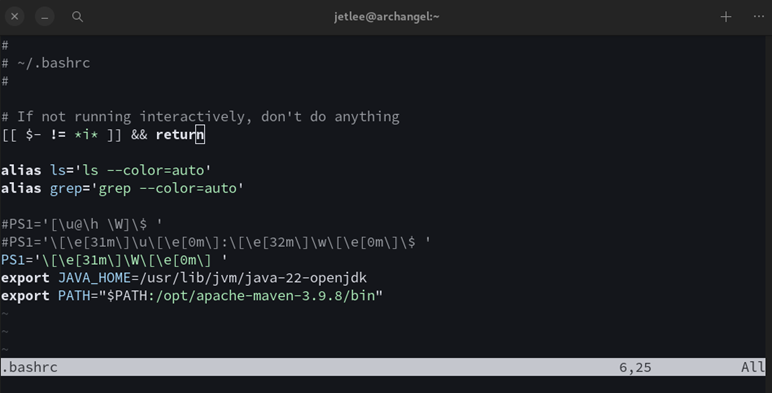
\u: Username
\h: Hostname up to the first .
\w: Current working directory
\A: Time in 24-hour format (HH)
\[\e[31m\]: Start of color sequence (red in this case)
\[\e[32m\]: Start of color sequence (green in this case)
\[\e[0m\]: Reset color to default
Creating a desktop launcher for any executable
- user specific
nvim ~/.local/share/applications/appname.desktop- system specific
nvim /user/share/applications/appname.desktopContents of appname.desktop
[Desktop Entry]
Version=1.0
Name=Hello World
Comment=Prints Hello, World! to the terminal
Exec=/home/username/hello-world.sh
Icon=utilities-terminal
Terminal=true
Type=Application
Categories=Utility;- make the file executable
chmode +x path/to/appname.desktopInstalling patch for Suckless terminal
# Clone the suckless.org repository for the st terminal emulator
git clone https://git.suckless.org/st

# Navigate into the cloned repository directory
cd st

# Create a new directory to store patches
mkdir patches

# Download a specific patch file from a URL (replace with actual URL)
wget url-to-patch-file.diff

# Apply the downloaded patch to the st codebase, assuming it's a standard patch
patch -p1 < patch-file-name

# Move the original patch file into the patches directory (in case we want to revert it later)
mv patch-file.diff patches/

# Remove the config.h file (assuming it was created by the previous patch and no longer needed)
rm config.h

# Clean and install the st terminal emulator using sudo
sudo make clean install
Clean up the system
- remove orphaned packages
sudo pacman -Rns $(pacman -Qtdq)- clear package cache
sudo paccache -r - clean package database
sudo pacman -Sc- remove unused configuration files
sudo find /etc -name "*.pacnew" -or -name "*.pacsave" -or -name "*.pacorig" -exec rm -i {} \;- check for broken packages
lddtree -l -R /usr/lib /usr/bin /usr/sbin 2>/dev/null | grep 'not found'- clean up logs
sudo journalctl --vacuum-time=2weeks
sudo journalctl --vacuum-size=100M- remove temporary files
sudo rm -rf /tmp/*Setting the refresh rate for external monitor
- Use the
cvtcommand to generate a modeline for your desired resolution and refresh rate.
For example, for a 1920 x 1080 resolution at 100hz
cvt 1920 1080 100
# output
1920x1080 99.90 Hz (CVT) hsync: 114.50 kHz; pclk: 285.50 MHz
Modeline "1920x1080_100.00" 285.50 1920 2064 2264 2608 1080 1083 1088 1160 -hsync +vsync- Now add the mode to display
xrandr --newmode "1920x1080_100.00"  285.50  1920 2064 2264 2608  1080 1083 1088 1160 -hsync +vsync
xrandr --addmode HDMI-1 "1920x1080_100.00" #replace HDMI-1 with correct output name for the display- Set the display to use the new mode
xrandr --output HDMI-1 --mode "1920x1080_100.00"